

CME GPP-3 Progressive Sustain Grand Piano Pedals The Need for More PedalsA more and more common scenario: You sit there in front of your piano-action MIDI controller keyboard, a spiffing new virtual piano instrument loaded into your computer. The piano depicted on screen proudly displays three or even four foot pedals: You look down on your own floor – and at your own lonely, instant-switch foot pedal that has scuttled away from its intended position and is lurking in a corner well out of reach – sensing that perhaps you lack something to get the most out of that software. Now, if you're not deadly serious about Playing The Piano – as opposed to simply produce piano sounds using a keyboard – the difference may not be a crucial one. But with the new crop of virtual pianos, capable of emulating more or less every part of a real grand piano's mechanism (the Modartt Pianoteq being an especially good point in case), more and more users begin to realise certain facts:
Luckily, Chinese controller manufacturer CME has identified this gap in the market, and come up with a corker of a product concept : The CME GPP-3 3-pedal, grand piano-style pedal set. The rightmost pedal (sustain) is progressive, the other 2 are standard on/off switches. With 3 polished brass pedals in a black wooden casing, this thing really looks the business. So how does it work in practice? Connections The GPP-3 has an admirable set of connection options:
Pedal Capabilities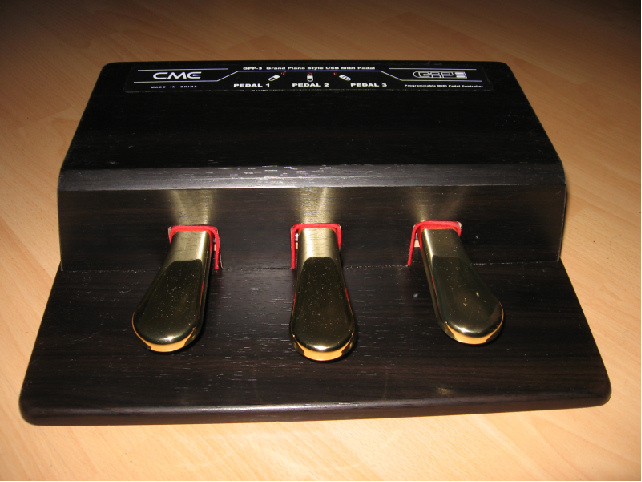 By default, the pedals are mapped to the following standard MIDI CC codes (from right to left): 64 (Sustain, progressive, controller range 0-127), 66 (Sostenuto), 67 (Una Corda). This should do nicely for any modern virtual grand piano instrument right out of the box, provided the programmer knows his MIDI. (However, the unit may give you trouble with older instruments that expect an on/off sustain pedal - for example, my Vintaudio Yamaha C7 felt inclined to produce a pedal FX sound for each new CC #64 value it received from the sustain pedal, not expecting there to be more than one "on" value.) You can change the polarity of any pedal by keeping it pressed while powering on the unit. Each pedal is individually programmable – you can change both its MIDI CC number and MIDI channel. If you should want to re-program the pedals, you can put the unit in MIDI programming mode by pressing down all 3 pedal for about 3 seconds. Then, prepare for quite a lot of flashing LEDs and pedal-pressing to assign the new controller number and/or MIDI channel for the desired pedal. I have not tried it out myself, but I'm sure it works according to spec. Note that you can NOT change the range of values sent by the progressive pedal - it always goes all the way between 0 and 127. The trim knob at the back is only for the analog output. Pedal MechanicsThe spring action of all 3 pedals is quite firm and fairly even between the progressive pedal and the others. Both spring force and pedal travel seems just about right to me, although the is probably a bit more "sideways wobble" to the action compared to a real mechanical instrument. Nothing dramatic, though. The progressive pedal on my unit has a comfortable deadzone at each end of the travel, making sure that the pedal output value stays steady at 0 and 127 respectively when the pedal is fully up or fully down. Build and FinishAs mentioned before, the GPP-3 really looks the business - Polished brass pedals, a wood-textured, black cabinet and pedal holes lined with red felt. Looking a bit closer, though, reveals that the cabinet is actually made of vinyl-coated MDF board. That's solid enough, but the question is what happens to the imitated wood coat over time. Wood or not, this thing is heavy: 4 kilos and rubber feet means it will stay put on your floor, which is a great advantage over flimsy, single pedals. It really installs a lot more confidence in your pedalling when your foot doesn't have to chase the pedal all over the floor. Having a peek inside, another nice fact for do-it-yourself hackers is revealed: The pedal mechanism is entirely mounted in a steel frame, making its function independent of the external housing. It would only be a few minutes work to remove the pedal assembly and the two PCB boards from inside, and put them to use in another housing. A final, nice addition to the product is the 3 included plastic, frosted pedal covers. These snap on to provide protection for the pedal surfaces when using the unit with dirty outdoor shoes, for example. Software and FirmwareAll smooth sailing then? Unfortunately, not quite. I have already had some problems with the GPP-3 software. At one point early on, the unit became totally unresponsive: No pedal indicator lights flashed, no matter how many re-programming and factory setting resets i tried. I can see two possible causes for this: One, some malfunction of the firmware program as delivered in the box. Two, the unit perhaps didn't take kindly to Windows XP being put in hibernation mode. (Windows XP hibernation seems a of a hit and miss affair with most USB devices - every time I think of trying it, one or more of my connected instruments is usually quick to remind me that it is a bad idea.) After much agonising, I resorted to updating/re-downloading the firmware. This is an easy procedure in itself – what is not so easy is finding the firmware software and updater program on CME's web site. It's not yet in the list of official downloads - you have to register in the support forums, then browse them looking for info about the GPP-3. You will eventually find the stuff needed in an attachment to a post from the CME CEO himself... So – finally having procured the firmware, I put the unit in "firmware upgrade" mode, downloaded the firmware, restarted the GGP-3 - and it was OK again. Unfortunately, the unit is also keen to switch pedal polarities of its own accord, if left switched on during computer turn-off/start procedures. Although getting the right polarity back is theoretically just a matter of keeping the offending pedal pressed down while switching the unit on, it's a real pain in the backside: From my experiments, it seems you must make sure the MIDI port is truly released (by quitting any MIDI-related applications) before you can successfully re-start the unit and perform the polarity-switching procedure. Also, make sure the unit is left with power off for a minute or so before trying to reset, otherwise the calibration of the progressive pedal goes out of whack, at least on my unit. ConclusionQuestionable firmware aside, this unit does everything it's supposed to do, does it pretty darn well, and seems built to last as well. Adding a GPP-3 to your piano-action keyboard will get you that much closer to a real grand piano simulation, without the space and cash requirements! |